No Hidden Fees

You can always count on our leasing team for clear and concise leases. We’re not here to nickel and dime you. There are no hidden fees or undisclosed expenses to surprise you when you lease an executive suite. The shared amenities are part of the deal, not an add on.

Nearby Amenities

Our new Executive Suites are just a short drive away from Dulles International Airport and Dulles Town Center, which features many shops and food options such as Popeyes, Chick-Fil-A, and Chiang Mai Thai. Across the pond, you can find The Regal Center, with dining options such as Dominos, Chipotle Mexican Grill, Toosso, Bonchon, and O’Faolain’s Irish Pub.

Directly behind the Regal Center, you can find the Regal Cinemas, which play all of the latest blockbusters. Just down Route 7, you can find two other great entertainment options in Topgolf and Indoor Skydiving. There is no shortage of fun in Sterling!

Within the office park development, there is a dry cleaner, an Orangetheory Fitness, two different daycares, and numerous medical offices. Also within easy walking distance, there are several quick options to hop out for a break, such as McDonald’s, Starbucks, or 7-Eleven.

Not familiar with the Sterling area? The map below speaks for itself!

Screen Shot 2017-10-30 at 10.54.48 AM

A New Office Experience

Bernstein Management Group is committed to bringing a new look to its spaces to match the market’s ever changing demands. Our newly renovated Executive Suites feature an all-tile floor and bright LED lighting show off the limitless potential of your future office. A facade flush with windows brings ample natural light. Our professionally managed spaces ensure that our tenants get exactly what they need from an office space. The shared amenities are just the icing on top!

When you get an Executive Suite with us, you also get access to a brand new, state of the art shared kitchen with brand new appliances such as a refrigerator and a dishwasher. You will also gain access to a shared Conference Room in which to meet clients and hold larger discussions.

Concerned that the space is perfect for now, but planning to grow rapidly? When your company is ready to expand, Bernstein Management Group has larger spaces in its portfolio that we can design and build out to fit your specific needs. We’ll help you move to the space that is right for you right now!


Using 3D tours to plan buildouts

Matterport Floorplan ViewOne of the benefits that we’ve seen to virtual tours is the use of the dollhouse and floorplan function in order to plan renovations/buildouts. The fact that you can see exactly where things are going before you put them in is a huge boon. You can also do before and after scans of common renovation type that you do in order to show off your abilities. I don’t currently have any before and afters that you could use as an example, but heres an example of one of our renovations: 6 Pidgeon Hill.

Tips for scanning large spaces

Interior 20The other day I was tasked with scanning a warehouse that had been built out into an indoor playground. The warehouse measured around 15000 square feet and half of it had significant buildout, from offices and party rooms, to bathrooms and reception. So I put my Matterport thinking hat on, and thought about the best, most efficient way to scan the premises for future uses. I tried to think about what a potential future tenant would like to see from this sort of space, and it hit me. It was a warehouse use. It would be very unlikely to see the same buildout that was currently there. I decided that the most important aspect was to get a fluid tour that really emphasized the size of the space, and the wide open areas within it.

The approach I took for this tour was simple. Minimal scans in open areas to give the feel of travel time between scans makes the space feel even bigger in my opinion. In smaller, tighter corridors I elect for more scans, especially in offices or areas with seating. When one takes a tour of  a future office, they want to see as many angles as possible to really immerse themselves in the future office. Check out the differences in scan density in this tour here.

Savvy Tip: Still Images without a Scan

Exterior 4One trick to get more use out of your camera is using the 3D views option to get still images for your own use. However, did you know that there is no scan component to these? This opens up the camera to some more “flexibility”, especially those of us who are lucky enough to have the Pro2 version with its print quality images.

For instance, I had a problem the other day: I needed exterior photos of out property 7777 Leesburg Pike, but I don’t have an actual camera to take stills. So I simply took some 3D views at multiple angles nearby so that I could later go into the workshop. At the same time though, I’m selling my truck, which is parked right outside of the shot. So I used the same 3D scans to get a clear picture of my truck!

Obviously this has other applications as well. Say you had a property that you didn’t need a tour of, and you wanted still images of it, but, like me, you didn’t have a traditional camera. In theory, you could simply open up a previously completed scan, add a 3D view at a new location, and upload that for no cost, so that you could extract the stills you need at your leisure.

As always, thats all theoretical, a measure you could take as a stopgap if you were in a jam. Thanks for reading and I hope this helps!

Time saving tips for scanning an entire Floor

07.06.2017_15.23.00So for this tip, I’ve got a quick time saving tip for scanning an entire floor all at once, and then breaking it up into segments. We did this as the current space is one large contiguous area, but we were considering dividing it up to better suit our future tenant’s needs. So on top of the initial scan of the entire space, we also needed 3 scans of each smaller space. Here’s how I saved a good deal of time:

Using Matterport’s ability to reupload, you can forgo rescanning one of the areas entirely should you need to do what I did, and separate the floor into smaller spaces. I went with the lower third, as it was the biggest and hardest to scan of the three. To accomplish this, simply delete the scans of the other two spaces after you have uploaded the entire floor. This leaves you with just the one section. After some mild trimming, you should be able to upload again, saving yourself time, and the fee to upload a new space. If you’re trying to be exceptionally frugal, you could even remove the trim after you upload, begin scanning the next space, and then delete the prior scans and reupload again, giving you another free scan. Repeat this process a 3rd time, and you’ve saved yourself almost $60 total.

I hope these tips helped you as much as they helped me stay within the budgeted free scans, and to save time on this one very specific case. To see the tours for 10 Pidgeon Hill, please follow this link.

Sterling Village Center: The Tours

Shaw Road Sterling Village Retail Center Sterling Village Center is where I’ve done a number of virtual tours used in examples for tips and tricks that I’ve posted. For instance, the bakery I’ve previously discussed along with the convenience store are both located here. The main perk of shooting here is the delicious food at Buffalo Wing Factory though. Its some high quality stuff. All of the tours for Sterling Village can be found here on our website. There is also plenty of other commercial real estate for lease, such as a turnkey nail salon, and a bakery. I think it would be great to open a Bakery in Sterling.

Virtual tours to document Renovations

Pic 6An extremely valuable use for the Matterport Camera is documenting renovations. This is especially helpful when you have contracted renovations out to someone else. You can use the same scans and take multiple tours of the same space, without having to be charged for a reupload. We use this to show off the various finishes we can do on the space, and to highlight the care we put into our buildings. The tenants can use the new tour to show potential customers their location before they check it out of the first time. Its a win-win for everyone!

Space Walkthrough: Sterling Village 114

Sterling Village Center. A pretty Zen little shopping center next to a buddhist temple. We generally recommend keeping your shoes on before walking inside any of the shops or restaurants here.

One unique offering that we have for this particular center is a turn-key bakery. I had a blast shooting the virtual tour for this space due to all of the various reflective surfaces. There was a lot of hiding involved. To take the tour of this space with me, visit our website and click the tab labelled “Virtual Tours” and then Suite 114.

One fun note, I actually shot this tour in reverse, as I knew I was in a bit of a time crunch, and wanted to hit the areas I knew would be challenging due to reflections and trimming required. So naturally I started on the actual Baking side of things. But for the sake of the tour, I’ll run through it the way I intended it to be toured.

So first of all, you have just the main cafe area:Interior 2Here you have some seating, and various display cases used for showing off your baked goods, as the is a bakery. Pretty nice layout if you ask me. I personally like the bright red counter.

After that, if you walk down to the right, you’ll find the office:Interior 6 Sometimes, you need to get some administrative tasks done when you’re not baking, or selling your baked goods. Its a nice perk to have.

Interior 7After that, there is a little sink that separates the two spaces. I personally love lots of sinks, because I’m a bit of a germaphobe. It definitely pays off to stay clean in food service industries.

Up next is the bakery. Its where all the baking magic happens. I happen to know very little about baking, but I’ve heard that its basically tasty chemistry, and I can get behind that:Interior 13This bakery comes with tons of baking equipment, and is ready to go day one, so with this tour I really sought to capture that aspect. Lots of shots directly in front of equipment for convenience sake.

How I learned to love stairs

beautiful-stairsOne big complaint I often see on Matterport support or on the matterport forums is how hard stairs are to scan. And I don’t disagree! But there are ways to make scanning stairs easier and more methodical. Here are some tricks I picked up along the way!

  1. Keep scans on the stairs, save landings for the end if at all possible. If you’re able to do this, which is sometimes impossible, you will save a good amount of time that you would normally use fiddling around with tripod leg length.
  2. Only adjust one leg to a different length at a time. I actually almost lost a camera to experimenting with different tripod leg length. Luckily I caught it and the crisis was averted.
  3. This one is kind of obvious and ties into the other two, but once you’ve found a good, stable base, you can just move that base up and down the stairs, and it should work perfectly.


Another big issue that I’ve seen extremely often is scanning spiral staircases with your Matterport Camera for virtual tours. I’m actually zero help here because I’ve never done it. But heres a cool picture of one!spiral hd

While you’re here, check out this cool bank space I shot

Matterport Nemesis: Mirrors

07.12.2017_11.09.03 Don’t be this guy. Who is me. I shouldn’t have to say this, but getting caught in reflective surfaces and thus being part of your scans is not a good look. Whether it be a mirror, glass surface, or just an oddly shiny wall, try to position yourself so that the camera does not catch you or itself when it does its scan. I got a little careless here, and thought I was out of line of sight. When in doubt, the capture app has a feature that allows you to preview your scan before you process it. This can help you make sure your scans are up to par.

Avoiding mirrors is all about geometry. I scanned a gym in Sterling with a huge wall mounted mirror which required a good deal of movement on my end to avoid being caught in the scans. Check out the tour here: The Regal Center Gym. It was actually a blast trying to stay out of the way if I must say so myself.

Another way that I’ve heard about from some residential real estate friends is using cheese cloth to cover mirrors for scans in bathrooms. I’ve personally not tried it myself, so take that with a grain of salt.

Whether you’re hiding, avoiding, or covering up mirrors, I hope you find these tips helpful!

Getting the most out of scans.

07.06.2017_15.23.00Sometimes you can get a little extra out of your scans if you’re crafty enough. In this building, we have one large suite with 14000 square feet. We’re thinking about dividing it up into 3 different spaces. We wanted to be able to visually look at the tours and the floor plans for each unique space. We were able to scan the whole thing in one go, and use the scans to divide it up amongst the 3 spaces. Once you have the entire floor plan, you can upload the big scan, and then delete scans as you see fit in order to shape the space to what you desire. I used this trick to carve out the other three spaces, along with the trim tool to clean up the borders. This was done at one of our properties.

Another trick which you can use to get the most out of you camera is using your 3D views for still photography. This is mostly pertinent for those of you with the Pro 2 camera with its higher resolution lens. Since 3D views aren’t tied to any scans or to GPS data, you can literally select any tour on the capture app, take 3D views, then capture screenshots to have print quality shots next time you upload.

Using Matterport to get floorplans

05.12.2017_09.41.07 copyOne fun aspect of commercial real estate versus residential real estate is using the scans from your commercial spaces to directly visualize changes to a space before you make them. Matterport has the ability to general floorplans using the same scanner that you use for your virtual tours. Take a look at 226 Maple Avenue, an Office Building that we are leasing in Vienna. Find it here: 226 Maple Avenue Suite 205

With the virtual tour, we can use the scans as a tool to help us lease Vienna office space on 123. Alternatively, we can visualize renovations before they happen, and use the before and after pictures in our targeted marketing and sales. We also take the floor plans Matterport gives us and place them in the lease. I hope you enjoyed these quick tips, and if you need a Vienna VA office, feel free to check out the link above and contact me!

The Role of VR in Virtual Tours

518530-sony-playstation-vr

Hello, and sorry about the break! Had a bit too much fun over the fourth! But boy am I excited to talk to you about Virtual Reality (side note, good company name and tongue twister: Virtual Realty Virtual Reality).

I know I harp on this all the time, but Virtual Reality in Matterport tours is ALL ABOUT IMMERSION. The more you can make it feel like the viewer is actually there, the better. If you’re focused on generating VR friendly tours, you want to keep a few things in mind:

  1. Scan Spacing: Unlike normal tours where you might be able to cheat your way out of a few scans in long hallways, you need to keep a particular cadence to your scans so that moving about doesn’t feel unnatural.
  2. Scan Pace: Sometimes, within a room such as a small office, you might take 2-3 scans and call it a day. With VR in mind, this may not be the best course of action. Think about the angles clients will want to see! Get those angles! Check out 2220 Cedar. Boom, Immersive.
  3. Ease of navigation: Sometimes, VR controls can be a little weird. Make it easier on the viewer by adding scans in “trouble areas” such as inside doors.
  4. Get a cool Headset: Yes, Google Cardboard does in fact function. But Daydream is much better looking! People are shallow. Especially people who don’t know as much about VR. Wow them with a cool Headset

Mattertags Uses: Get Creative!

Dollhouse ViewWhen you experiment with your Matterport 3D camera and its Cloud, one feature that can make a tour more special is Mattertags. Mattertags allow you to embed media and websites within the tour to enhance the tour experience.Here are a couple uses for Mattertags that I’ve used personally.

  1. Equipment or furniture description: In the case of, say, a piece of specialized equipment that you want to highlight in the tour, you can add a description of what it is and what it does, and why it is special. In the case of furniture, I’ve seen rare antiques highlighted and a brief description given about its history. Fun facts like this are something that you’d go over in a regular tour, why should an online client miss out on them in a virtual one?
  2. Inserting amenities videos/ Links to virtual tours of other nearby spaces: This is a good way to keep a viewer engaged. Maybe the space isn’t big enough for them. Instead of losing their interest, you can offer a link to a larger space that the can tour, or a link to walkable amenities to increase the value of your space.
  3. Exterior photos: Everyone wants to see what the space looks like from the outside. Give them the full experience.

As you can see, the common thread is that you have been provided a tool to make your tours as immersive and as helpful as they can possibly be, you just need to utilize them!

Space Profile: Sterling Village Bakery

Matterport Dollhouse ViewToday I took on an interesting space: A Bakery located in Sterling, Virginia, at the Sterling Village Center (Check out the tours from here). This space was quick and fun to shoot, but always a bit challenging to stay out of the shot on. Almost everything in the right side was reflective somehow! I used was more geometry to stay out of line of sight than I would have preferred, and I may have missed a few “cameos” when I published the scans.

I’ve always liked this bakery space in our portfolio, and I really think it could be leveraged well if the right bakery were to take it. Its right in the middle of a couple restaurants that could definitely use their baked goods, and a nearby hotel that could leverage the whole “local” aspect of it. But enough about that, you’re here for the tips and tricks.

The only real trick to this space was positioning both scans and myself so that I wasn’t in them, due to all of the reflective surfaces. And that was some relatively basic geometry. Other than that it wasn’t a huge deal, just remembering pacing and such.

Today’s Thought: Tour Flow

Exterior Money Shot 2Today I’ll be talking about something that is the most important thing for immersion in tours. Immersion is important, because although you aren’t there to give the tour in person, you want to make the viewer feel like they are walking the space, and not just looking at a more detailed floor plan. Unfortunately, this mostly comes with practice and tweaking, but there are some simple steps to keep in mind. Check out 11751 Rockville Pike for a good example of the concepts below.
  1. Close scans: When you first start scanning, or at least when I did, you’re going to think, “I’m going to do more scans so that I get more detail, and viewers can get more angles!” This is a big rookie mistake. Sure, you’ll get more angles, and more detail, but it will be a chore to simply navigate your tour with the arrow keys.
  2. Uniformity: Think about walking. Most people walk at a certain pace, with equal stride length. To make the tour more immersive, I tend to stage the space, then walk it like I was touring it for the first time myself. After that, I think about where I would want to steer viewers to. From there, you can determine a sort of natural pace. As an added bonus, having a pace to your scans helps to avoid alignment and low overlap errors.
  3. Planning for Doors: Doors are, bar none, the #1 Matterport headache causer. If you don’t figure out doors early, you’re gonna be in for a rough ride. Try to pace your scans so that the camera is closer to the doorway as opposed to scans in the middle of a hallway. This will save you many alignment headaches.

Challenge: Occupied spaces

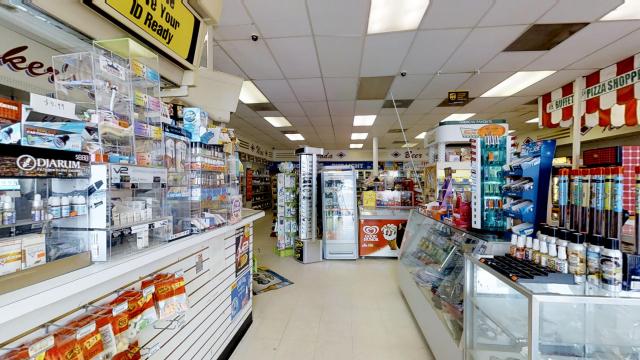
Interior 1.1One of the biggest challenges in commercial real estate is turnover. Sometimes, you’re trying to lease a space before a tenant has even moved out. Such was the case in a current scan I did for one of out properties: In-and-Out Market located at Sterling Village Center.

The biggest challenge was my timing. The only time I could get clearance to shoot from the tenant was during a relatively busy time of day for his spot. There was a lot of people moving in and out of the shop. The shop has two busy restaurants on either side of it as well. Not a great recipe for a tour, or so I thought at the time.

I really like to start my tours with a shot from just outside the front door, and to set that as the starting point so that the viewer gets the experience of walking n the door and then walking around as if they are there. Some tours that start in the middle of a space for example, kind of ruin my immersion for me. So it was important for me to get that shot. I ended up getting lucky and getting a full scan in before another wave of customers came in.

06.27.2017_12.12.39

As far as customers on the inside of the shop, someone in the scan doesn’t always kill the scan for you. It can actually be helpful to have someone in the shot, as long as they aren’t close enough to cause alignment issues or are being disruptive. A customer standing in line at the shop I was scanning actually helped bring some life to an otherwise underwhelming scan. My general Rule of thumb is I will throw out any scans with a person within 10 feet or so for alignment purposes.

As always, the preview tool is your friend. Use your judgement to determine whether having someone in the shot disrupts or helps. If all else fails, block entrance to the premises or scan at a time when it is less busy, or not open.

3D Views: When?

06.09.2017_17.49.23

3D views are often a misunderstood tool. There’s a common misconception that their only use is for lower resolution exterior photos for when you’ve forgotten your real camera. While that is a totally legitimate use (I’ve done it) there are plenty of other ways to leverage this tool to make your scans really stand out. Here are some of my favorites.

The 3D view I LOVE to get is the entrance in the sunlight view. Normally if I’m shooting on an overcast day, I will start my tour with my first scan outside looking into the door. But if its a beautiful day out, I’ll grab a quick 3D view outside to use as a kind of cover photo for the tour. See Suite 150 under Virtual Tours for a good example.

Another trick with 3D views is grabbing good shots of traffic counts in your parking lot. Pick a time when your parking lot is busy, and grab a shot with most of the spaces full. Little, subtle things like this can help you even if you don’t make it a point of emphasis. A client with a keen eye will notice.

Challenge: Efficient scanning/Time Use

Interior 3If you’re like me, Matterport is probably not 100% of your job. I also have many responsibilities around the office. So when I’m in a bind, but I know I have to get a tour put together, I like to think about what the most efficient way to go about my tour, without sacrificing quality. After dozens of tours, my big takeaway is this: Door Stops and Hallways are where you’ll save the most time.

Let me explain what I mean by this: Unless you have something to highlight in a long hallway or a doorway in that hallway, think about how you would navigate it in a tour if you were a customer. You’d want to get to the next room to check it out as soon as possible. The same goes for just about any wide open area, especially for unfurnished spaces. Check out suite 110 for some long sight lines where I was able to save time without sacrificing quality.

Now I know that some people haven’t had the “pleasure” of dealing with doors that won’t stay open, but its fairly common in the commercial world. Door stops are your best friend in this situation. I actually broke my first Matterport camera my first day on my first tour due to trusting that a door would stay put with a makeshift door stop. Imagine explaining that to your boss!

Daily Challenge: Recursion

05.12.2017_09.41.07 copyEver scan a large office building, only for your model to be off? I know I have. Nothing like the camera getting confused by long hallways, or the infamous cubicle rows to REALLY brighten your day. I faced this struggle on a 12000sf scan of mine recently and had to be quick on my feet to figure out a way to differentiate the cubicles so that the camera could figure out where it was. Thats where the biggest tool a Matterport user can have came into play: The Doorstop.

Doorstops are like magic: You see them, you know what they are, but you don’t really acknowledge or recognize they’re there. Its like a little invisible helper. Obviously they’re helpful in staging your shot by keeping doors open for better sight lines, but using them as landmarks in a scan has helped me out of a jam on MANY occasions.06.22.2017_10.32.50See the sneaky doorstop in the bottom of the shot? A little differentiating factor to help the camera get its bearings. See if you can find any more of my sneaky doorstop uses in the tour of 1308 Devil’s Reach Road.

Today’s Challenge: Occupied/Storage

Exterior 4Today, bright and early, I set out to do a relatively routine scan for a relatively routine purpose: For a floor plan. We currently use the space as a short term storage for all of the things we use to keep our properties in great shape, so there are myriad piles of things all around. The space is also in use, so a lot of the planning and staging that went into the execution of this tour was more so about positioning myself in places where I would not only be out of the shot, but be able to keep others out of the frame when it was rotating towards them. I wasn’t 100% successful, but i only settled on shots where people were far enough away as to not truly interfere or distract from the subject property. See if you can find anyone in any of my Virtual Tours for 7777 Leesburg Pike.

The biggest challenge for the storage space was definitely coming up with some of the more unique sightlines. Since there were things like AN ENTIRE AC UNIT in the space, I had to get creative if I wanted good alignment. Thank goodness for a reliable tripod. Some of the more “tricky” shots really had me holding my breath! These kinds of jobs where you run into issues that you have to think around are definitely my favorite. Getting to think outside the box and see the full potential of the camera reminds you that at the end of the day, its a pretty special piece of gear.

Sterling Village: The Tours

Sterling Village Center

Sterling Village Center. I used to come here all the time to indulge in Buffalo Wing Factory, and their all-you-can-eat wings back in high school. Now that I’m older, the place is even better since I can partake in their great craft beer selection. But enough reminiscing, and onto the meat of this blog: Virtual Tours.

Sterling Village Center was a fun, if not a little hectic place to shoot tours for Commercial Real Estate. I didn’t experience any weird issues like my Leesburg pike shoots, but there was the added challenge of having to shoot a center that was that busy. Check out the tours here!

The biggest surprise of the experience was definitely a hidden treasure located in the Gym space. As I was prepping the space by opening doors and turning on lights, I was basically startled by how nice the bathroom was. Definitely a stark contrast to the functional and somewhat spartan gym that its a part of. See if you agree by checking out the tour!

Bathroom 1

Tours at 226 Maple Avenue, West

226 Maple Avenue

226 Maple Avenue, West, in Vienna. Talk about a building that went through a bit of a renaissance. I love whats been done with the interior finishes here, probably my favorite common areas of any of our buildings. The way the walls and floor have been done really makes the spaces pop. Take a look for yourself!06.19.2017_09.59.47

You can also check out the Property Page for 226 Maple and take the virtual tours you can find there. Its a much easier way to check out this property to help you filter out the properties that you REALLY want to be a part of.

The Lobby isn’t the only place that impresses from an aesthetic viewpoint. The newly renovated suites contained within show just a fraction of what Bernstein Management Group is capable of from a design standpoint. But thats for another day! Thanks for reading and checking out our virtual tours!